

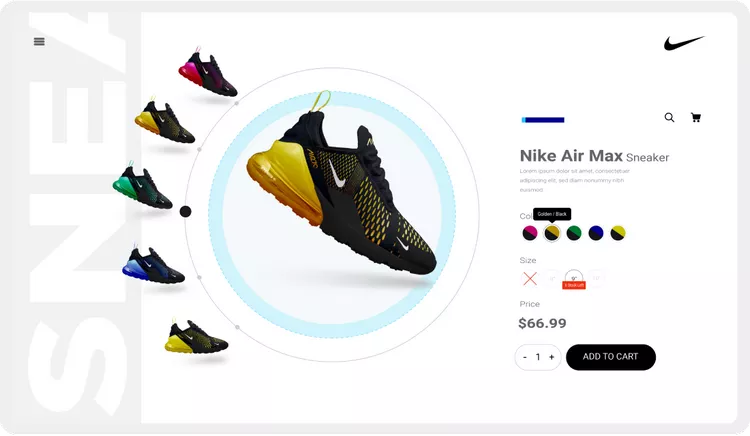
Style your store using ThemeHigh's Variation Swatches for WooCommerce plugin by personalizing product variation styles and adding custom swatches designs.
Add Multiple Swatch Designs
Swatch Designs let you add design types by customizing icons, hover and border, tooltip, and other display styling.
For a single website, you can create countless design types. And so, you can easily select any of the created swatches design that is appropriate for your store theme, enhancing its appeal.
Swatch Display Styles
Displaying a large number of variations on a single page may seem clumsy and may not serve your store’s theme. Keep your variations organized with different styles that go with your store’s theme. There are five different styles for displaying swatches other than the default style: Swatch Dropdown, Slider, Accordion, Horizontal Scroller, and Vertical Scroller.
In the case of the Dropdown style option, you can list every image and color variation as a dropdown. This style also provides an advanced search option to find a specific variation.
Stock left alert & out of stock
Inform shoppers about the stock left and out-of-stock variants to make their shopping experience more seamless and your website more engaging. Show the number of stock left for each product variant. In addition, highlight the out-of-stock items to alert customers to make a quick purchase.
Unavailable/Stock Behavioural Styling
Informing customers about product availability is essential, and showcasing them in style is a plus. The default behavioural style, which is the “Out of Stock” text, is used to indicate any out-of-stock variation. In addition to the default style other behavioural styles like Blur, Blur with Cross, Blur with Cancel, and Hide are available.
Bicolor Swatches
Showing a single-color product variation option on a dual-colored product would confuse customers. The Woocommerce Variation Swatches plugin lets you display dual-color in a single swatch to give clear detail about multicolored products.
Downloads
Payment is required to download file at a low cost and without fees.You can save your money up to 90% and 100% virus free files.
No waiting! The download will available after successful payment.

11 453 posts
No comments
To leave a comment, you must to our site.










Only our members are allowed to comment this post.